Giving Tuesday is on Tuesday 1 December 2026, and a small team can cover it with three emails: an appeal in the days before, a short reminder on the day and a thank-you straight after. Good Giving Tuesday email design puts the ask and what the money does in live text, gives each email one Donate button, and keeps all three on the same brand kit. In Milo Email Studio you build them on a drag-and-drop canvas, send a Test, then export HTML or MJML for your ESP or push Zoho Campaigns drafts.
Most small charities and community groups don't have a designer, and Giving Tuesday asks for three emails in one week. Built in a hurry, they end up looking like three different organisations. Build the appeal once on your brand kit, duplicate it for the reminder, start the thank-you from a starter that's already the right shape, and all three look like you. Your time goes on the words, not the layout.
In short
- Three emails: appeal, reminder, thank-you.
- One ask in live text, one Donate button, one brand kit.
- Build, Test, then export HTML or MJML, or push to Zoho.
When is Giving Tuesday 2026?
Giving Tuesday 2026 is on Tuesday 1 December, the Tuesday after US Thanksgiving. It's a global generosity movement, marked in the UK too.
Giving Tuesday lands the day after Cyber Monday, when inboxes are still full of sale emails. If you also run a shop, the Black Friday and Cyber Monday set covers those. Your Giving Tuesday emails should look and sound different: no countdowns, no discounts, just a clear ask. Plan three send points:
- The appeal: in the week before.
- The reminder: on 1 December.
- The thank-you: straight after each gift, or straight after the day.
Three emails, three jobs
- The appeal makes the case. One specific ask, what it pays for, and why now.
- The reminder says "today's the day". Short, with the same ask and the same button.
- The thank-you closes the loop. It tells people what their gift does, so they're glad they gave.
Three is enough for most small teams. Each one has a single job, which makes each one easier to write.
The appeal: one ask, in live text
Lead with a specific amount and what it does. "£15 feeds a family for a week" (an example for a community food bank) is easier to say yes to than "please give what you can". Then one sentence on why now, and one Donate button that goes to your own donation page.
Keep the ask in live text, not baked into an image. It still reads with images off, and it shows up in the inbox preview. One real photo helps, with alt text that says what's in it, such as "Volunteers packing food parcels at the hall". Skip the image-only hero: if it doesn't load, the ask goes with it.
The reminder: short, and on the day
The reminder is the appeal with a new headline. Duplicate the appeal, rename it, and change the headline to the day itself: "It's Giving Tuesday". Keep the same button and the same look, so people recognise it.
If you have a real progress figure, add it as one line of live text, such as "We're two thirds of the way there". Only use it if it's true on the morning you send, and leave it out if you don't know.
The thank-you: send it fast
A thank-you that arrives quickly feels like a person wrote it. Start from the Welcome starter, which already has a greeting, one button and two next steps. It's the same shape as the Welcome starter's greeting and next steps, with different words.
Say thank you, say what the gift does in plain terms, and give one clear next step on the button, such as sharing the appeal. The starter's two smaller next steps suit things like volunteering. Don't ask for another donation in the same email. That can wait.
Keep all three on brand without a designer
There's no Giving Tuesday or donation starter in Milo, and you don't need one. Promo becomes the appeal: its headline turns into your ask, and the button text and link are yours to change. Welcome becomes the thank-you. If you'd rather send an impact update, Newsletter fits that.
Your brand kit does the styling. A new email picks up your kit's colours, fonts and buttons, and you can apply a kit to an email you've already made. If you haven't made one yet, set your colours, fonts and buttons once. Free includes one brand kit and 20 emails, so this set fits on Free.
Duplicate keeps the set consistent. Duplicate an email and the copy keeps its blocks, brand kit, subject and preview text. It's named "Copy of" the original, so rename it. It doesn't carry the due date, so set that on the copy. Give all three a due date and the set sits together on your Planner. The due date is there for planning, and the emails go out from your ESP.
You're the builder, and the AI designer is there when you'd like a hand with the words. It doesn't know your figures, so give it the facts: "Reminder for our food bank's Giving Tuesday appeal: £15 feeds a family for a week, we're two thirds of the way there, one Donate button. Set a subject and preview line." It drafts on-brand blocks you edit on the canvas and can set the email's name, subject and preview text. It places photos you upload or pick, but it doesn't make them. There's more on how the AI designer drafts blocks.
Giving Tuesday subject lines and preview text
Warm and specific works better than urgent here. One pair per email for an example community food bank:
- Appeal. Subject: "£15 feeds a family for a week". Preview: "This Giving Tuesday, help us fill the shelves in time for winter."
- Reminder. Subject: "It's Giving Tuesday". Preview: "Today's the day. £15 feeds a family for a week."
- Thank-you. Subject: "Thank you. Here's what your gift does". Preview: "Your gift is already on the shelves."
Each email in Milo has its own preview text, up to 180 characters, but short reads better. A duplicate keeps the preview text of the email you copied, so change it on the reminder. Our guide to preview text for each email has more.
Test, then hand them to your ESP
Send yourself a Test of each email before it goes anywhere. Milo sends it to an address on your account with "Test:" and the email's name as the subject, so you see it as a supporter would. Check the ask reads with images off, the Donate button goes to your real donation page, and the footer has an unsubscribe link. The checks we run before every export cover the rest.
Then take export-ready HTML or MJML into your ESP, or push each email as a Zoho Campaigns draft. If you push to Zoho, keep its unsubscribe tag, $[LI:UNSUBSCRIBE]$, in the footer. Milo warns you before the push if it's missing. Scheduling, sending and donor lists live in your ESP, and the donations themselves happen on your donation page.
How we built this
On 27 October 2026 we built the three emails for an example community food bank in Milo Email Studio, by hand on the canvas. This workspace had no brand kit ("No brand selected"), so no kit was applied and the emails kept the starters' default look. We didn't use the AI designer for any of the copy.
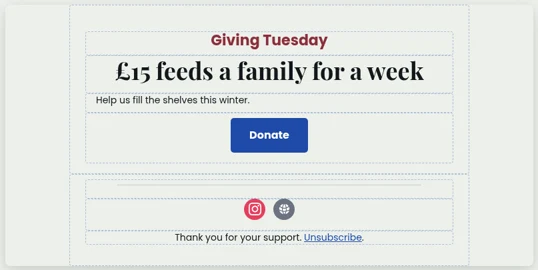
The appeal started from the Promo starter. We changed the small label above the headline to "Giving Tuesday", the headline to "£15 feeds a family for a week" and the supporting line to "Help us fill the shelves this winter." We pointed the button, now "Donate", at a placeholder donation page, and changed the footer to "Thank you for your support." with the starter's Unsubscribe link. Then we set the subject, the preview text and a due date of 24 November.
For the reminder we duplicated the appeal. The copy opened straight in the editor as "Copy of Giving Tuesday appeal", with the appeal's blocks, subject and preview text, and an empty due date. We renamed it "Giving Tuesday reminder", changed the headline to "It's Giving Tuesday" and the supporting line to "We're two thirds of the way there", updated the subject and preview text, and set it for 1 December.
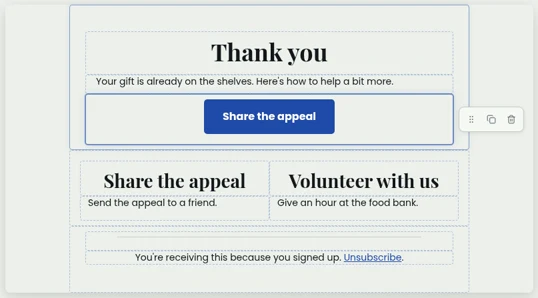
The thank-you started from the Welcome starter. We changed the headline to "Thank you", the body to "Your gift is already on the shelves. Here's how to help a bit more." and the button to "Share the appeal". The two next steps became "Share the appeal" ("Send the appeal to a friend.") and "Volunteer with us" ("Give an hour at the food bank."). We left the starter's footer and Unsubscribe link as they were, and set it for 2 December.
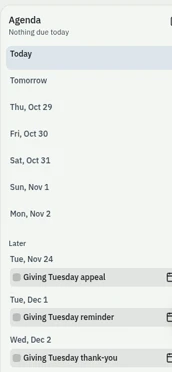
With due dates set, all three sat together in the Agenda beside the emails list, and the reminder and thank-you showed on the Planner's December page. The appeal, due 24 November, sits on the November page.

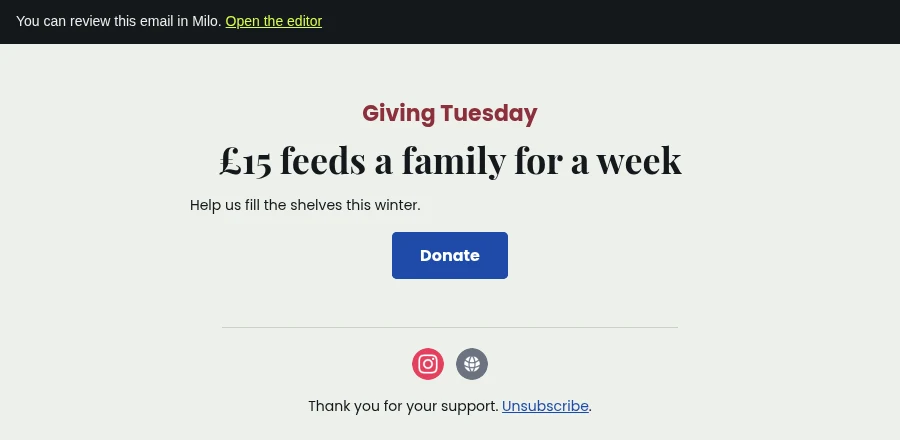
We sent a Test of the appeal. The dialog said "Test email sent successfully", and it arrived with the subject "Test: Giving Tuesday appeal" and a short banner at the top with a link back to the editor. The preview text came through as the inbox preview line.
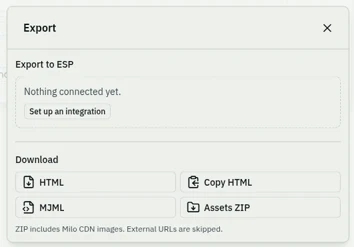
Then we downloaded HTML and MJML for the appeal. Both files have the ask, the supporting line and the Donate button in live text, the preview text, and the placeholder links, including the Unsubscribe link, ready to swap for your own. No ESP was connected in this workspace ("Nothing connected yet"), so we didn't push a Zoho Campaigns draft.
Try it on your appeal first.
Questions
When is Giving Tuesday 2026?
Tuesday 1 December 2026.
How many emails should I send for Giving Tuesday?
Three covers it for most small teams: an appeal before, a reminder on the day and a thank-you after.
What should a Giving Tuesday email include?
One specific ask, what the money does, one Donate button and a real photo, all on your brand.
What should I write in a donation thank-you email?
Thank them by name if your ESP has it, say what their gift does, and give one next step. Don't ask again in the same email.
Is there a Giving Tuesday email template in Milo?
Not a dedicated one. Start the appeal from Promo and the thank-you from Welcome, on your brand kit.
Can the AI designer write the appeal?
It can draft blocks, subject lines and preview text from the facts you give it, and you edit them.
Can people donate inside the email?
No. The button links to your own donation page.
How do I get the emails into my ESP?
Export HTML or MJML, or push drafts to Zoho Campaigns.